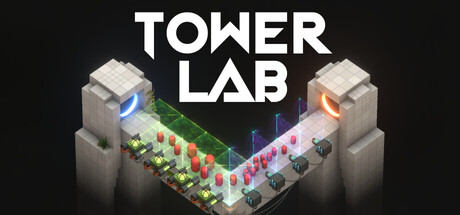
- Tower Lab mobile status: No native iOS or Android version is confirmed on the current official listing.
- Supported platforms: The planned release lists Windows and macOS through Steam.
- Portable option: Steam Deck is marked Playable, providing the clearest handheld route.
- Core gameplay: Physics-based tower defense uses pushing, pulling, bouncing, and flinging instead of health damage.
- Best next step: Review the official Tower Lab Steam page before release.
Tower Lab mobile Availability and Platform Status
For players searching for Tower Lab mobile, the most important distinction is between a mobile storefront app and a native mobile game. The official listing currently presents Tower Lab as a Steam strategy title planned for release on September 7, 2026. It lists Windows and macOS system requirements, while Steam Deck compatibility is marked Playable.
The listing does not confirm dedicated iOS or Android support. That means readers should not assume that installing the Steam Mobile App will install or run Tower Lab on a phone or tablet. The Steam Mobile App is a storefront and account-management tool; it is not evidence of native mobile compatibility.
| Platform or service | Current status | What it means |
|---|---|---|
| Windows | Planned Steam support | Minimum requirements are listed for Windows 10 64-bit. |
| macOS | Planned Steam support | macOS 12.0 Monterey or later is listed as the minimum operating system. |
| Steam Deck | Playable | The official Steam compatibility label supports handheld PC play. |
| iPhone or iPad | Not confirmed | No native iOS version is announced in the current listing. |
| Android phones or tablets | Not confirmed | No native Android version is announced in the current listing. |
| Steam Mobile App | Available as a Steam service | Useful for browsing, wishlisting, and notifications, but not a mobile game client. |
Do not treat unofficial APK files, mobile download pages, or third-party ports as confirmed Tower Lab releases. Use the official Steam listing and developer announcements for platform news.
The planned release information may change as development continues. Tower Lab is described as an Early Access game, and the developers expect the Early Access period to last roughly 6 to 12 months. Platform announcements should therefore be checked again after the planned 2026 release.
How Tower Lab Plays on Supported Devices
Tower Lab is a physics-driven strategy game built around displacement rather than conventional damage numbers. Enemies do not use health bars as the central combat system. Instead, towers push, pull, bounce, grow, shrink, and fling robots away from the playable area.
That design makes the game especially dependent on precise placement and readable interactions. Players can place towers in open spaces, move them freely, and combine effects into improvised machines. A touchscreen version would need careful interface design, but the current listing only documents keyboard-and-mouse computer support and a mouse-only accessibility option.
Physics Defense
Enemies are removed by displacement. Pushes, pulls, bounces, and launches replace ordinary damage calculations.
Open Placement
Towers can be placed in open areas and moved freely, encouraging experimentation instead of fixed lanes.
Roguelite Runs
Draft cards, select cores, reroll choices, remove upgrades, and shape each run around different interactions.
Sandbox Creation
The planned feature set includes level building, decoration, and sharing through Steam Workshop.
| Gameplay feature | Practical effect | Planning advice |
|---|---|---|
| No traditional enemy health | Position and momentum matter more than raw damage | Study the map before spending upgrades. |
| Tower combinations | Effects can interact through real physics | Test complementary push, pull, and bounce tools. |
| Projectile scaling | Projectiles can grow for stronger impact | Balance power gains against control and placement risk. |
| Robot scaling | Smaller robots are easier to push; larger robots can improve rewards | Use size changes when the launch route is reliable. |
| Free movement | Towers are not restricted to a single fixed slot | Leave room for repositioning and future combinations. |
The game also includes multiple machines, each with a distinct run style, unique starting items, and real-time abilities. The Early Access listing identifies five playable machines, alongside 20 playable towers, each with its own technology tree.
The available run-building pool is also substantial for an Early Access launch: 26 player cores, 14 Hazard Cores, seven physics-effect cards, eight utility cards, and seven traps. These values describe the listed Early Access state and may be adjusted during development.
Before choosing a tower upgrade, identify where robots must travel and where they can leave the map. A strong effect in the wrong direction may create more control problems than value.
Tower Lab Setup Guide for PC and Handheld Play
Players without a native mobile release can prepare for Tower Lab through a supported computer or Steam Deck. The process below focuses on checking compatibility, understanding input needs, and setting expectations for an Early Access title.
Check the Official Store Listing
Open the Tower Lab Steam page and confirm the latest release information, supported operating systems, and developer announcements. The current planned release date is September 7, 2026.
Match Your Hardware
For Windows, compare your computer with the listed minimum of 8 GB RAM, an Intel Core i5-4590 or AMD FX-8350 equivalent, and a GTX 960 or Radeon R9 280 equivalent with 2 GB of VRAM. For macOS, check the listed macOS 12.0 requirement and supported Apple or Intel graphics.
Choose an Input Method
The listing identifies a mouse-only option and no quick-time-event requirement. A desktop mouse is the most clearly documented control method, while Steam Deck users should verify how the control layout feels for tower placement and camera movement.
Start with Controlled Experiments
Use early runs to test tower placement, projectile size, robot mass, and map edges. Do not spend every resource on immediate upgrades before understanding how the physics interact.
Track Early Access Changes
Expect balance adjustments, performance improvements, additional content, and evolving Workshop tools. Recheck patch notes and official community announcements when a mechanic behaves differently after an update.
| Hardware target | Minimum listed requirement | Recommended interpretation |
|---|---|---|
| Windows operating system | Windows 10 64-bit | A 64-bit processor and operating system are required. |
| Windows memory | 8 GB RAM | Meets the listed minimum for the planned PC version. |
| Windows graphics | GTX 960 or R9 280, 2 GB VRAM | DirectX 11 compatibility is required. |
| macOS operating system | macOS 12.0 Monterey or later | The listing supports Apple M1 or newer compatible Intel systems. |
| Storage | 2 GB available space | Applies to the listed Windows and macOS requirements. |
| Input | Mouse-only option listed | Useful for players who prefer direct cursor control. |
For players who want a handheld experience in 2026, Steam Deck is the only portable platform explicitly marked Playable in the current listing. Treat this as a handheld PC option, not proof of iOS or Android support.
A phone or tablet may still be useful for account management, wishlisting, and release notifications through Steam services. However, those functions should be kept separate from actual game compatibility. A mobile browser or Steam app can help you follow the project without representing a native mobile build.
Compatibility Checks and Early Access Expectations
Tower Lab’s Early Access structure is important when evaluating whether it fits your preferred setup. The listed version is described as playable from start to finish and includes multiple modes, meta-progression, a collection screen, and leaderboards. At the same time, balance, late-game content, performance, and Workshop tooling are still subject to development.
The developers plan to expand the roster of towers, traps, units, machines, cores, physics cards, rewards, regions, and campaign content. They also plan to improve environments, characters, towers, and the user interface. These plans can evolve as player feedback influences development priorities.
| Current Early Access element | Listed status | Why it matters |
|---|---|---|
| Campaign | Three regions initially | Provides a structured roguelite deckbuilding route. |
| Meta-progression | Included | Progress can continue beyond a single run. |
| Machines | Five playable machines | Each machine changes starting items and run style. |
| Towers | 20 playable towers | Each tower has its own technology tree. |
| Cores | 40 total listed | Includes 26 player cores and 14 Hazard Cores. |
| Leaderboards | Included for multiple modes | Supports score and performance comparison. |
| Steam Workshop | Planned feature and listed Steam feature | Enables level creation and community sharing as tooling develops. |
Use the following approach when deciding whether to play near release:
- Confirm your operating system and graphics hardware against the minimum requirements.
- Expect physics interactions and balance values to change during development.
- Keep room for experimentation instead of following a single rigid build.
- Use community discussions to identify known bugs or control issues.
- Consider waiting if you only want a finished, stable version with all planned content.
Before You Play:
- Check the official Steam page for the latest 2026 release information
- Confirm Windows or macOS hardware meets the listed minimum requirements
- Use a supported mouse or configure Steam Deck controls
- Understand that Tower Lab is planned as an Early Access release
- Follow official announcements for native mobile platform news
The current platform details come from the official Tower Lab Steam listing, checked for this guide on September 6, 2026. Native iOS and Android support is not confirmed there.
Mobile Player Recommendations and FAQ
If you primarily play on a phone, the practical recommendation is to monitor official announcements rather than rely on unofficial compatibility claims. If you already use a PC or Steam Deck, Tower Lab’s documented platform support gives you a clearer path to the physics-based tower defense experience.
The best early strategy is to treat each run as a controlled engineering test. Place a small number of towers, observe how they affect robot movement, and expand only after the launch path is predictable. Since enemies can be grown or shrunk, mass becomes part of the risk-and-reward decision rather than a simple stat upgrade.
Q: Is Tower Lab available on mobile phones?
A native iOS or Android version is not confirmed in the current official listing. The Steam Mobile App can manage your account and wishlist, but it is not a Tower Lab mobile game client.
Q: Can I play Tower Lab on Steam Deck?
Yes, the official Steam listing marks Tower Lab as Playable on Steam Deck. Players should still review the control layout because precise tower placement is central to the game.
Q: What platforms does Tower Lab support?
The planned Steam release lists Windows and macOS requirements. Steam Deck is marked Playable. The current listing does not confirm native iOS or Android support.
Q: What makes Tower Lab different from standard tower defense games?
Tower Lab focuses on physics instead of enemy health. Towers push, pull, bounce, grow, shrink, and fling robots off the map, while deckbuilding and roguelite progression shape each run.
If native mobile support is announced later, compare the official control scheme and hardware requirements before moving to a new platform. Until then, Steam Deck and supported desktop systems are the documented choices.
For ongoing updates, use the official Steam store page, Steam discussions, and the developer’s community channels. Those sources are the safest way to verify release changes, Early Access updates, performance fixes, and any future mobile announcement.